Crisis
How to document a crisis response, coordinate specialized follow-through, and maintain a clear record from the initial incident through resolution.
What a crisis record is for
A crisis log is the durable record of a student crisis response. It captures what happened, who responded, the team's risk determination, actions taken, notifications, follow-up, and whether the situation is resolved.
| Record | Question it answers | Example |
|---|---|---|
| Crisis log | What happened, and how did the team respond? | Behavioral or emotional crisis on July 26 |
| Specialized assessment | What type-specific assessment or reporting work was completed? | Suicide risk assessment or threat assessment |
| Notification | Who was contacted, when, how, and with what result? | Parent reached by phone |
| Safety plan | What warning signs, coping strategies, contacts, and environmental safeguards were agreed upon? | Active safety plan, version 2 |
| Ongoing update | What changed after the initial response? | Three-day follow-up completed |
A crisis log may be linked to an active case or a related service log. The crisis log remains the authoritative crisis-response record; the linked records preserve continuity with the student's broader support plan.
Before documenting
For an active or immediate safety concern, follow your district's crisis-response protocol and contact the appropriate crisis lead or emergency resource. Do not delay an emergency response, mandated report, or required notification while completing SocialNote.
SocialNote organizes documentation; it does not determine risk, replace professional judgment, or replace district, legal, clinical, or mandated-reporting requirements. Staff should use the tools and assessment processes approved by their district and within their role and training.
Record the information needed for continuity, accountability, and compliance. Follow district policy for educational records, access restrictions, retention, and any information that belongs in another protected system.
Finding crisis history
- Open Students and select the student.
- Choose Crisis in the student's left navigation.
- Review the history before creating a new record. Existing incidents, open follow-ups, and re-entry work may affect the current response.
The Crisis History workspace
The workspace combines a student-level history with operational follow-up. It shows:
| Area | What it helps you monitor |
|---|---|
| Summary cards | Total incidents, resolved and unresolved counts, and time since the last incident. |
| Follow-up strip | Open and overdue crisis tasks, active re-entry work, and open monitoring. |
| Search and filters | Find records by text, crisis type, risk level, or resolution status. |
| History table | Date, crisis type, risk, outcome, status, primary responder, and indicators for notifications, referrals, or overdue tasks. |
| Row actions | Review, print, edit, add specialized assessments, manage the safety plan, or record notifications. |
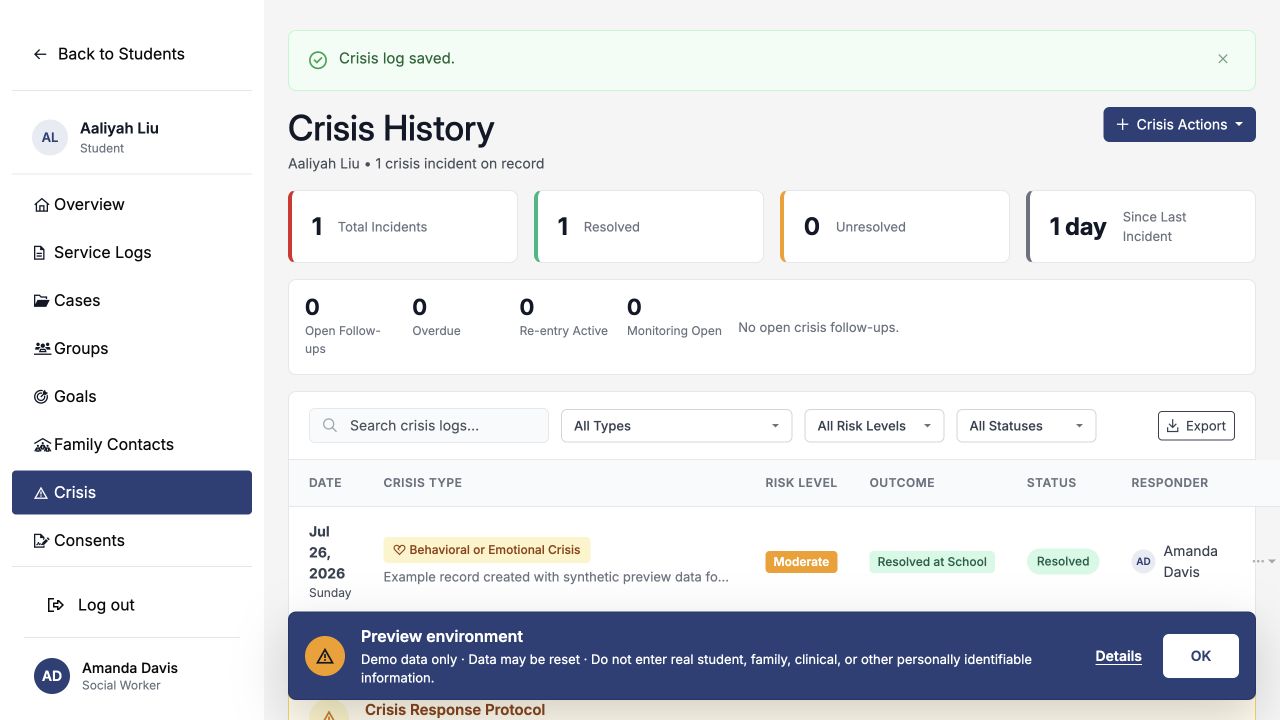
Use Print Crisis Record from a crisis row when you need a printable record. Follow district policy before downloading, printing, or sharing sensitive information.
Creating a crisis log
From Crisis History, open Crisis Actions and choose Create New Crisis Log. Work from the facts known at the time; you can add updates and revise the record as the response develops.
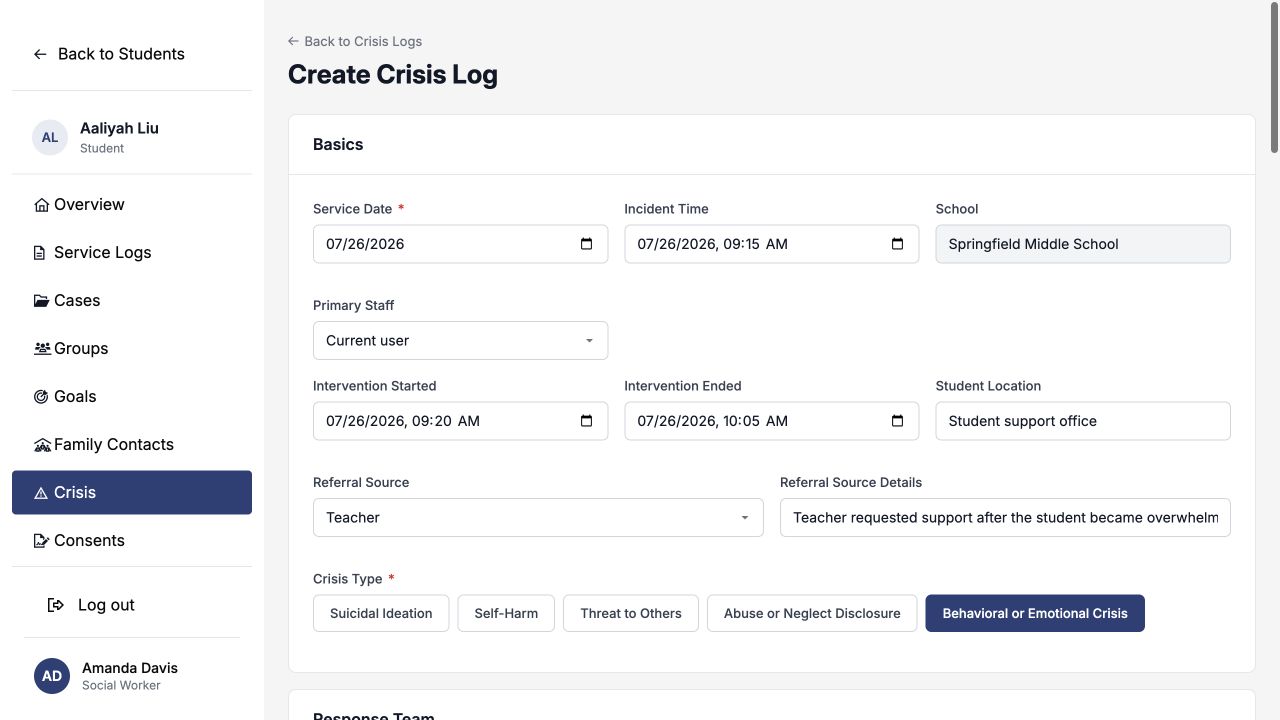
1. Basics
| Field | How to use it |
|---|---|
| Service Date * | The date the crisis response occurred. |
| Incident Time | When the incident began or was identified. |
| Primary Staff | The person responsible for the crisis record and follow-through. Leaving “Current user” selected assigns you. |
| Intervention Started / Ended | The actual response window, when known. |
| Student Location | Where the student was during the response. |
| Referral Source | Who brought the concern forward; use details to add useful context. |
| Crisis Type * | The category that best matches the response. This selection controls which specialized fields appear. |
2. Response Team
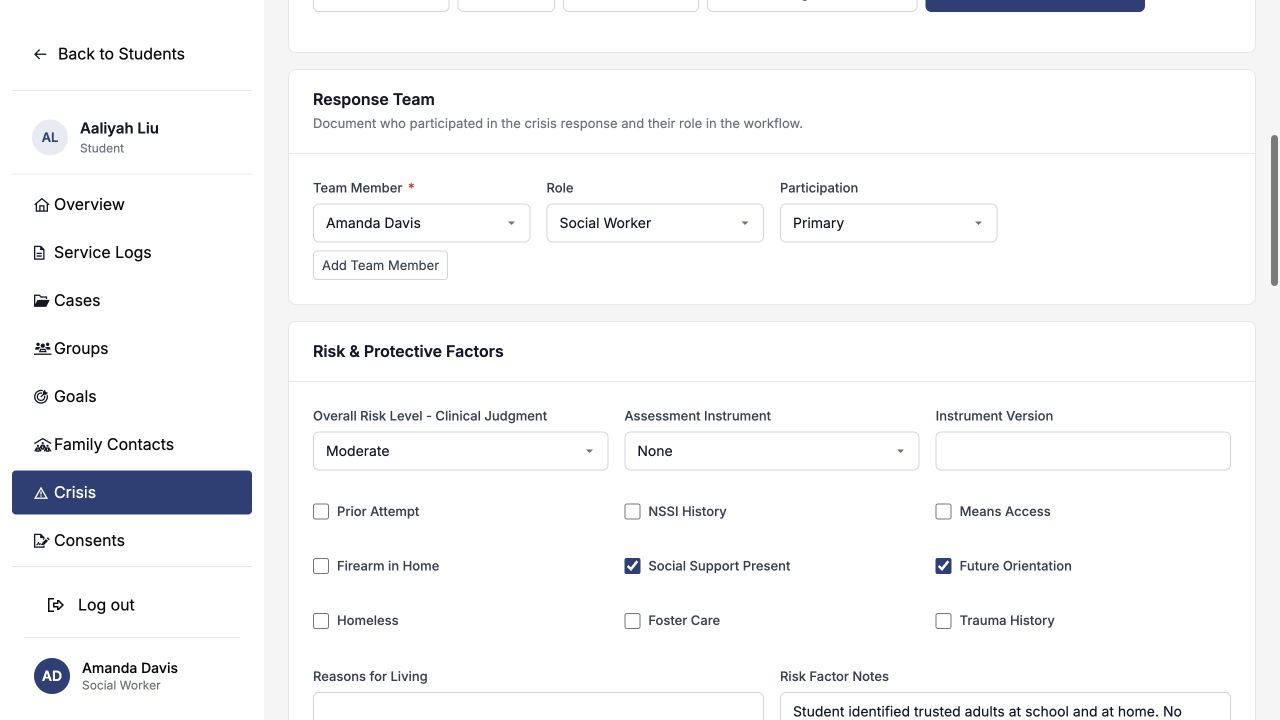
List everyone who participated, including each person's professional role and whether they were the primary responder, supporting, consulted, or notified. The primary staff member is included automatically; add other responders as needed.
3. Risk & Protective Factors
Record the team's clinical risk determination, the approved assessment instrument used, relevant risk factors, protective factors, and a concise summary. Risk choices are Low, Moderate, High, and Imminent.
The risk field documents the qualified responder's judgment after following the district's approved process. It is not a score generated by SocialNote.
4. Interventions
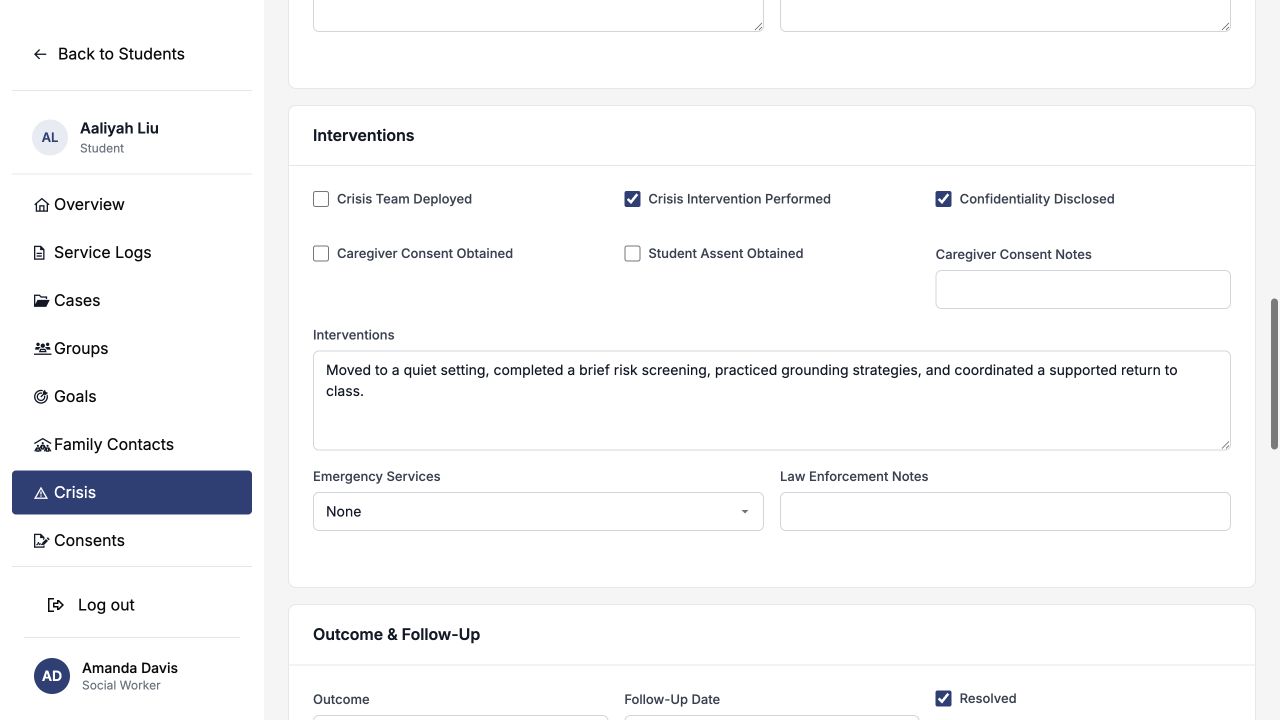
Summarize the actions actually taken. Use the checkboxes to identify whether a crisis intervention occurred, the crisis team was deployed, confidentiality limits were discussed, or consent and assent were obtained. Record emergency-service involvement accurately—even when the response was None.
5. Outcome & Follow-Up
Choose the current outcome, add the next follow-up date, and document re-entry or hospitalization information when it applies. Mark Resolved only when the response no longer requires active crisis follow-through; a record can be saved as unresolved and updated later.
6. Continuity and records
If the student has an active case or a recent service log, the Continuity section lets you connect it to this crisis record. The Compliance & Records section captures classification, FERPA restriction, reportability, retention, incident reporting, total time, and other district-defined record details.
How crisis type changes the form
| Crisis type | Additional workflow |
|---|---|
| Suicidal Ideation | Prompts suicide-risk assessment, caregiver notification, means-safety, and safety-planning work. After saving, a dedicated Suicide Risk Assessment action is available. |
| Self-Harm | Uses the same specialized suicide-risk assessment and safety-planning tools while preserving self-harm as the incident type. |
| Threat to Others | Adds a threat-assessment section for the behavior, preliminary determination, target or access details, team response, protective actions, supervision, intervention, and monitoring. |
| Abuse or Neglect Disclosure | Adds fields for the referral or report destination and details. Use Notifications to record the required external report and its outcome. |
| Behavioral or Emotional Crisis | Uses the core crisis workflow for team response, risk and protective factors, interventions, outcome, and follow-up. |
For threat, suicide, self-harm, abuse, or neglect concerns, follow the district-approved assessment, supervision, notification, and reporting process. SocialNote records what the team did; it does not replace those protocols.
Worked example: behavioral or emotional crisis
Scenario
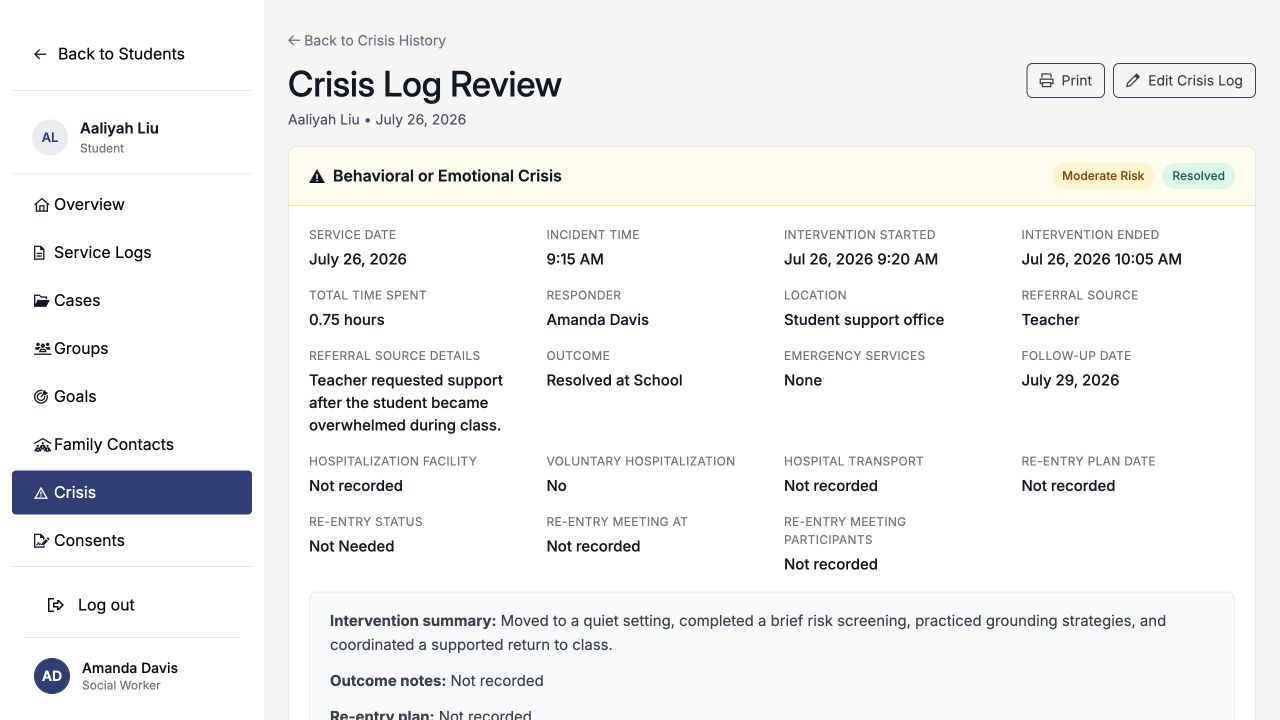
A teacher requests support after a sixth-grade student becomes overwhelmed during class. A social worker moves the student to a quiet setting, completes a brief risk screening, uses grounding strategies, and coordinates a supported return to class. The team determines moderate risk with no immediate safety threat and schedules a three-school-day check-in.
- Service Date
- July 26, 2026
- Incident Time
- 9:15 AM
- Student Location
- Student support office
- Referral Source
- Teacher
- Referral Source Details
- Teacher requested support after the student became overwhelmed during class.
- Crisis Type
- Behavioral or Emotional Crisis
- Overall Risk Level
- Moderate
- Protective Factors
- Social Support Present; Future Orientation
- Risk Factor Notes
- Student identified trusted adults at school and at home. No immediate safety threat was identified.
- Interventions
- Moved to a quiet setting, completed a brief risk screening, practiced grounding strategies, and coordinated a supported return to class.
- Outcome
- Resolved at School
- Follow-Up Date
- July 29, 2026
- Follow-Up Summary
- Check in with the student and teacher after three school days to confirm that the support plan is working.
- Total Time Spent
- 0.75 hours
Describe the concern, the response, the team's determination, and the next action. Avoid labels or conclusions that are not supported by the assessment and your professional role.
Review and specialized records
After saving, open the crisis row to review the complete record. The review page brings together:
- the crisis type, risk, outcome, status, timing, responder, and intervention summary;
- response-team members and risk/protective factors;
- threat or suicide assessment results when they apply;
- the active safety plan and earlier plan versions;
- notifications, follow-up tasks, ongoing updates, and the audit timeline; and
- record classification, FERPA restriction, reportability, retention, and incident-reporting details.
Specialized actions
| Action | When to use it |
|---|---|
| Suicide Risk Assessment | Available for suicidal-ideation and self-harm records. Document the approved instrument or protocol, risk summary, protective factors, and actions taken. |
| Create / Revise Safety Plan | Record warning signs, coping strategies, support contacts, crisis resources, environmental safeguards, acknowledgment, and revisions. |
| Threat Assessment | Available for threat-to-others records. Document the threat review, supervision, protective actions, intervention, consultation, and monitoring plan. |
| Abuse/Neglect workflow | Available for abuse-or-neglect records. Document the report or referral and related required notifications. |
| Notifications | Record the recipient, method, time, purpose, outcome, and notes for family, administrators, crisis team, agencies, law enforcement, hospital, or other required contacts. |
| Print Crisis Record | Create a print-friendly version for an authorized purpose. Handle it under district privacy and records policy. |
Ongoing updates and resolution
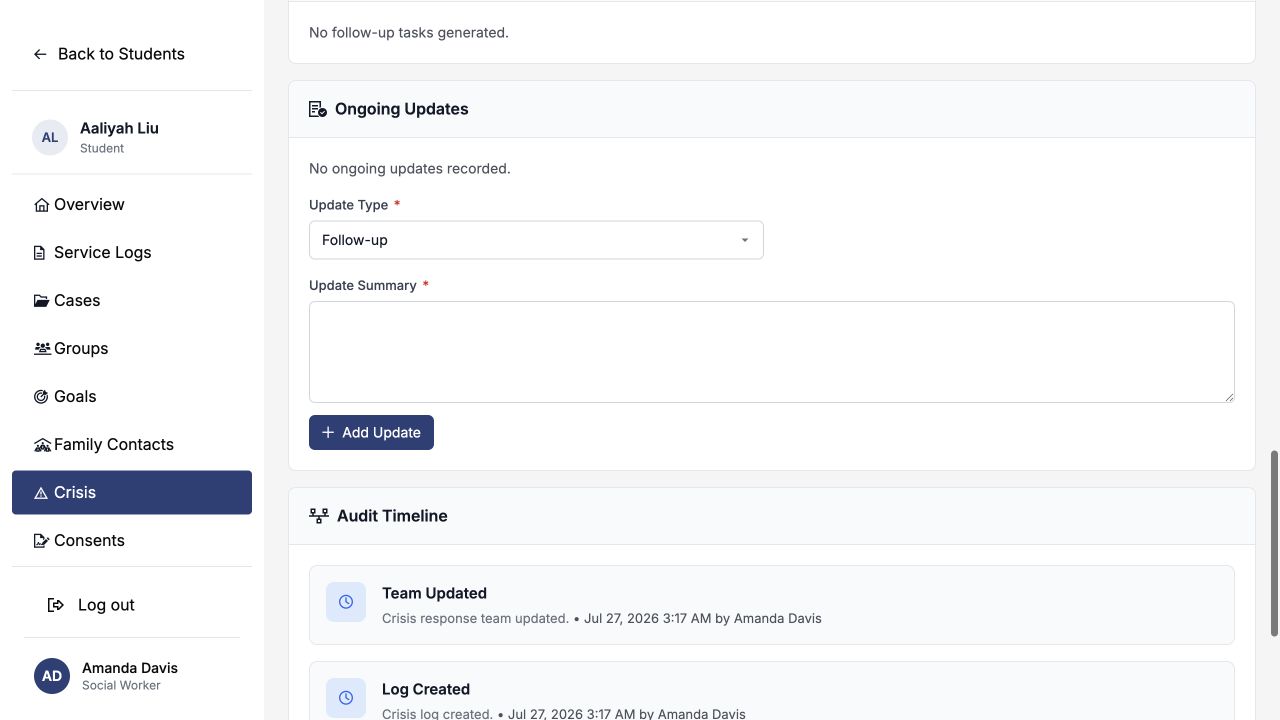
Use Ongoing Updates instead of repeatedly rewriting the original narrative. Choose an update type—Follow-up, Risk Reassessment, Re-entry, Outcome Update, Family Contact, Safety Monitoring, or General—and add a dated summary.
- Open the crisis record.
- Scroll to Ongoing Updates.
- Select the update type and write what changed, what was observed, and the next action.
- If the response is now complete, select Mark crisis as resolved before adding the update.
Crisis records cannot be deleted through the normal workflow. Marking a crisis resolved keeps the history available and completes the standard crisis follow-up and re-entry tasks that are still open.
Automatic follow-up tasks
SocialNote can create or update system tasks from structured crisis fields:
| Task | What triggers it |
|---|---|
| Crisis follow-up check-in | A Follow-Up Date. For high or imminent risk, the system uses the next day when no date is provided. |
| Crisis re-entry meeting | A re-entry meeting or plan date, unless Re-entry Status is Not Needed. |
| Threat supervision and consultation review | A substantive, serious substantive, or imminent threat determination. |
| Victim protection notification review | A substantive threat record where victim protection is needed. |
| Crisis record retention review | A Retention Until date. |
The primary staff member receives these tasks. Updating the structured dates updates the task; removing a trigger cancels the corresponding system task. Resolving the crisis completes the standard crisis check-in and re-entry tasks.
Who can do what
| User | Access |
|---|---|
| District administrator | Can create, edit, review, print, and add specialized crisis records for students in accessible schools. |
| Organization administrator | Can manage crisis records for students within the organization and schools they can access. |
| Social worker | Can create and manage crisis records for students in assigned or accessible schools. |
| Counselor | Can create and manage crisis records for students in assigned or accessible schools. |
| Psychologist | Can create and manage crisis records for students in assigned or accessible schools. |
| Other professional roles | May review crisis history for students they can access, but cannot create or edit crisis records unless their account has one of the management roles above. |
A user's role does not grant access across the district by itself. The student must belong to the same district and, when the student has a school, the user must have access to that school.
Field reference
| Section | What belongs there |
|---|---|
| Basics | Date and time, responder, location, referral source, and crisis type. |
| Response Team | Participants, professional roles, and participation type. |
| Risk & Protective Factors | Clinical risk determination, approved instrument, risk indicators, protective factors, and supporting notes. |
| Threat Assessment | Threat type and content, preliminary determination, access, targets, team response, supervision, victim protection, intervention, consultation, and monitoring. |
| Abuse/Neglect Workflow | External report or referral type and destination details. |
| Interventions | Response actions, consent or assent, emergency services, and law-enforcement notes. |
| Outcome & Follow-Up | Current outcome, follow-up, resolution, hospitalization, and re-entry information. |
| Continuity | Optional links to an active case or recent service log for the same student. |
| Compliance & Records | Classification, FERPA restriction, reportability, retention, incident report, time, notifications, equity flag, and trauma-informed approach. |
The crisis type, risk determination, intervention, outcome, follow-up date, resolution state, notifications, and specialized records should support the same account of what the team knew and did.