Working With Macro-Level Efforts
How to document district- and school-level work, select the right system or community codes, account for staff time, and show the reach of work that is not tied to an individual student.
What a macro-level effort accomplishes
A macro-level effort records completed work that improves a school, district, staff system, or community partnership rather than serving one identified student. It gives broad work a date, scope, duration, audience, service-code context, staff contribution, and estimated reach.
| Macro-level efforts do | Macro-level efforts do not |
|---|---|
| Document school-wide and district-wide systems work. | Create a future task, project plan, or ongoing status workflow. |
| Record community collaboration and staff/system support. | Maintain a named student roster or student attendance. |
| Account for each participating staff member’s portion of the work. | Replace individual service logs, cases, goals, or referrals. |
| Feed intervention and administrative reporting with effort counts, hours, and participants. | Automatically distribute the effort’s minutes equally among staff. |
A macro-level effort has no planned, active, or completed status. Create a dated record for each completed meeting, training, collaboration, or systems activity.
Choose the right SocialNote record
| Record | Use it when | Example |
|---|---|---|
| Individual service log | The work was delivered to or about a specific student. | Meeting with a student to address attendance barriers. |
| Group | A defined student roster receives a shared series of services and attendance matters. | A four-week attendance success group. |
| Macro-level effort | The work changes a broader system, builds staff capacity, or coordinates community resources without a student roster. | Coordinating a district resource fair with community partners. |
Good macro-level examples include staff professional development, MTSS implementation, district data review, school climate planning, interagency coordination, resource-fair preparation, and developing a community referral network.
Log the effort
- Open Macro-Level Efforts and select Log Effort.
- Enter the date the work occurred. SocialNote assigns the academic year from that date.
- Select the school, or leave School blank for a district-wide effort.
- Choose the MTSS tier, enter the total duration, and describe the work and outcome.
- Choose the audience and estimate how many people the effort reached, when known.
- Add at least one eligible service code and identify the primary code.
- Add participating staff and their time allocations, then select Log Effort.
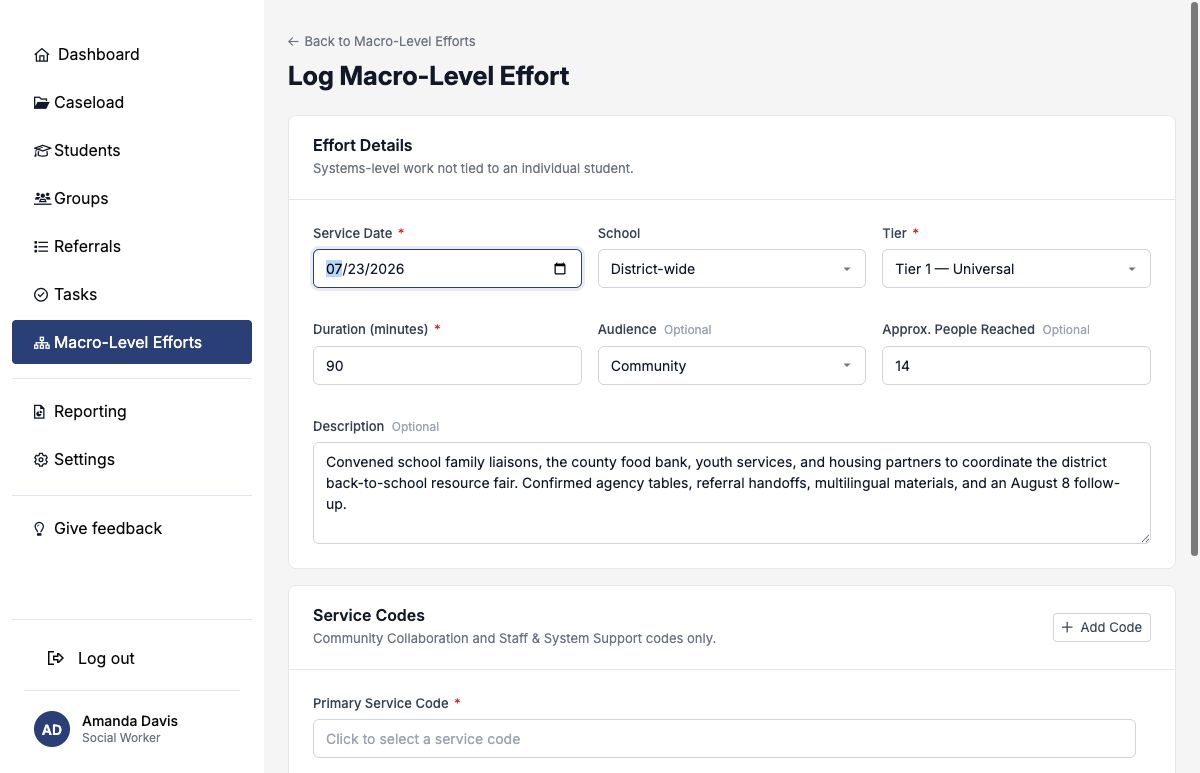
Describe the scope, intensity, and reach
| Field | How to use it |
|---|---|
| Service Date | The date the meeting, training, or systems activity occurred. |
| School | Select a school for school-scoped work. Leave it blank to record District-wide. |
| Tier | Tier 1 for universal systems and audiences; Tier 2 for targeted needs or populations; Tier 3 for intensive system response. |
| Duration | The total elapsed working time for the effort, from 1 to 1,440 minutes. |
| Audience | Staff, Parents/Guardians, Community, Administrators, or Students. |
| Approx. People Reached | The actual or best reasonable estimate of the broader audience reached, up to 100,000. |
| Description | What was done, who was involved at a high level, the result, and the next coordination step. |
People Reached estimates the effort’s audience or reach. Staff Participants names district team members whose working time should be represented. Do not use one as a substitute for the other.
Select eligible service codes
Macro-level efforts use active codes from two categories: Community Collaboration and Staff & System Support. Search by code number or description, select the main activity first, and add other codes only when they describe distinct work performed during the same effort.
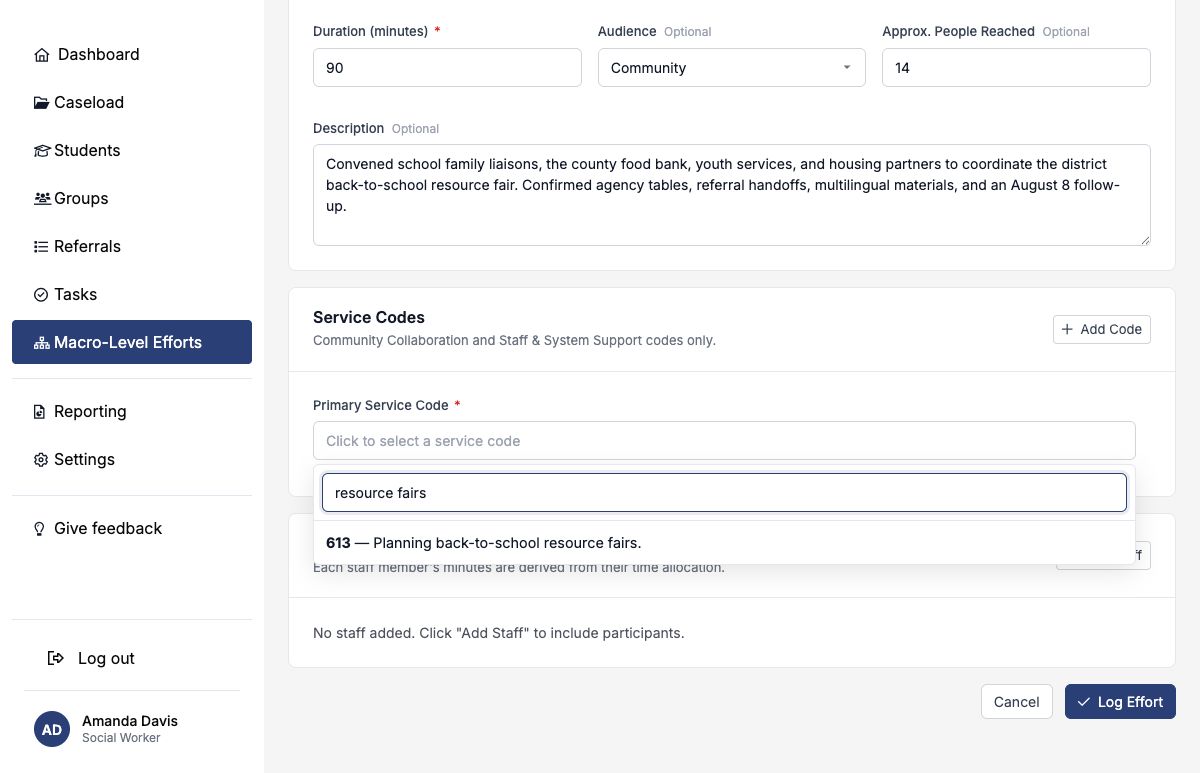
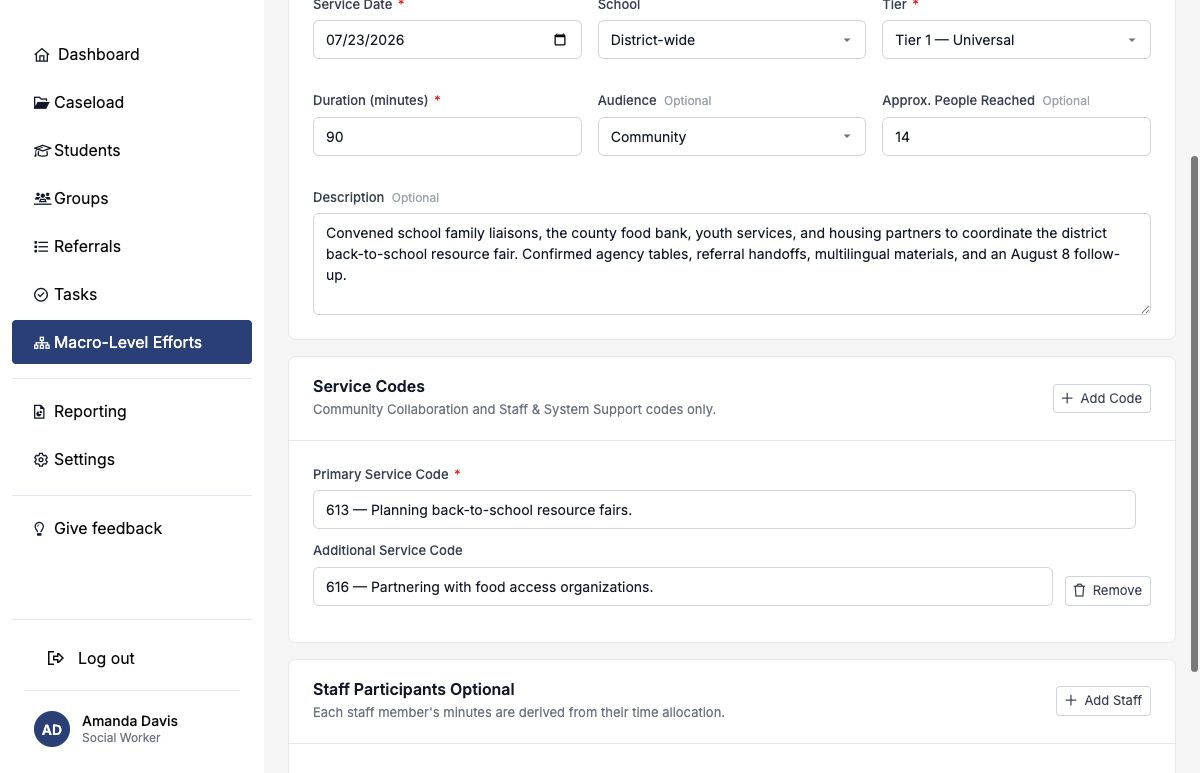
A primary Community Collaboration code displays the record as Community Collaboration; a primary Staff & System Support code displays it as Staff & System Support. Additional codes add context but do not change that category.
See the Service Code Reference for the full default taxonomy and search tools.
Account for participating staff time
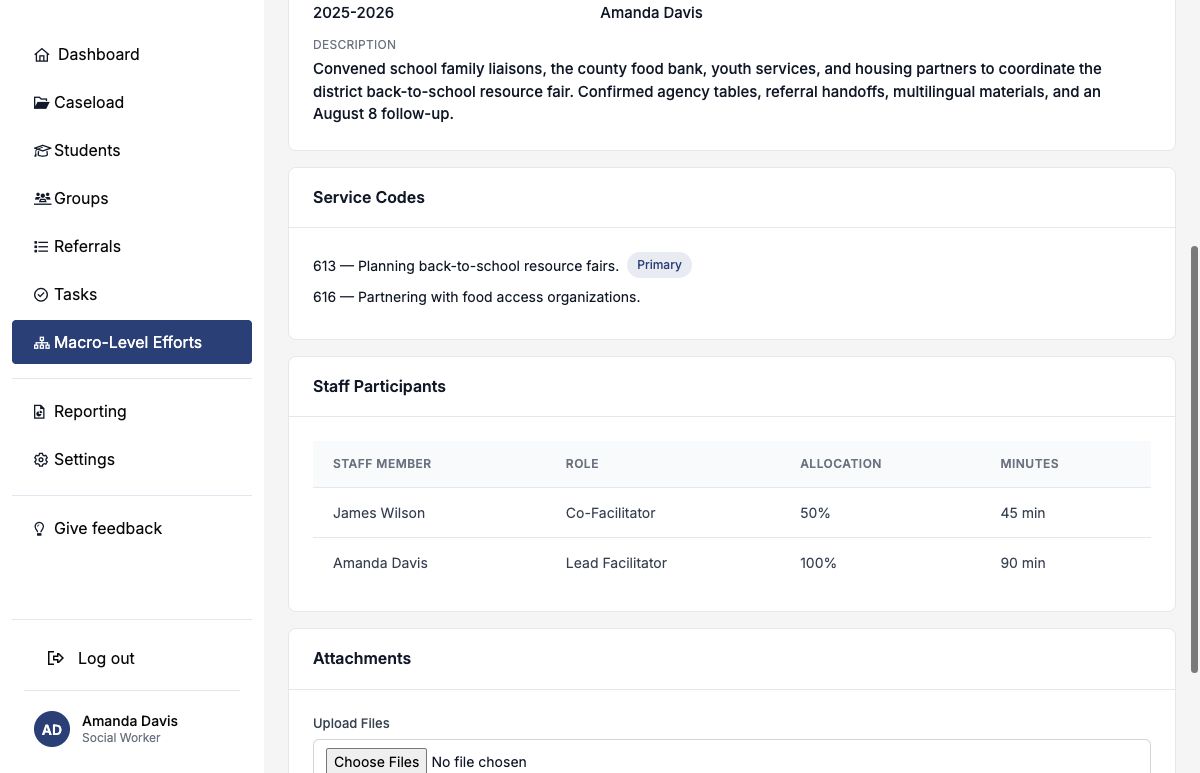
Staff participants are optional. Add each active district team member whose time should be associated with the effort, select their role, and enter the percentage of the effort’s duration attributable to them. SocialNote calculates minutes automatically.
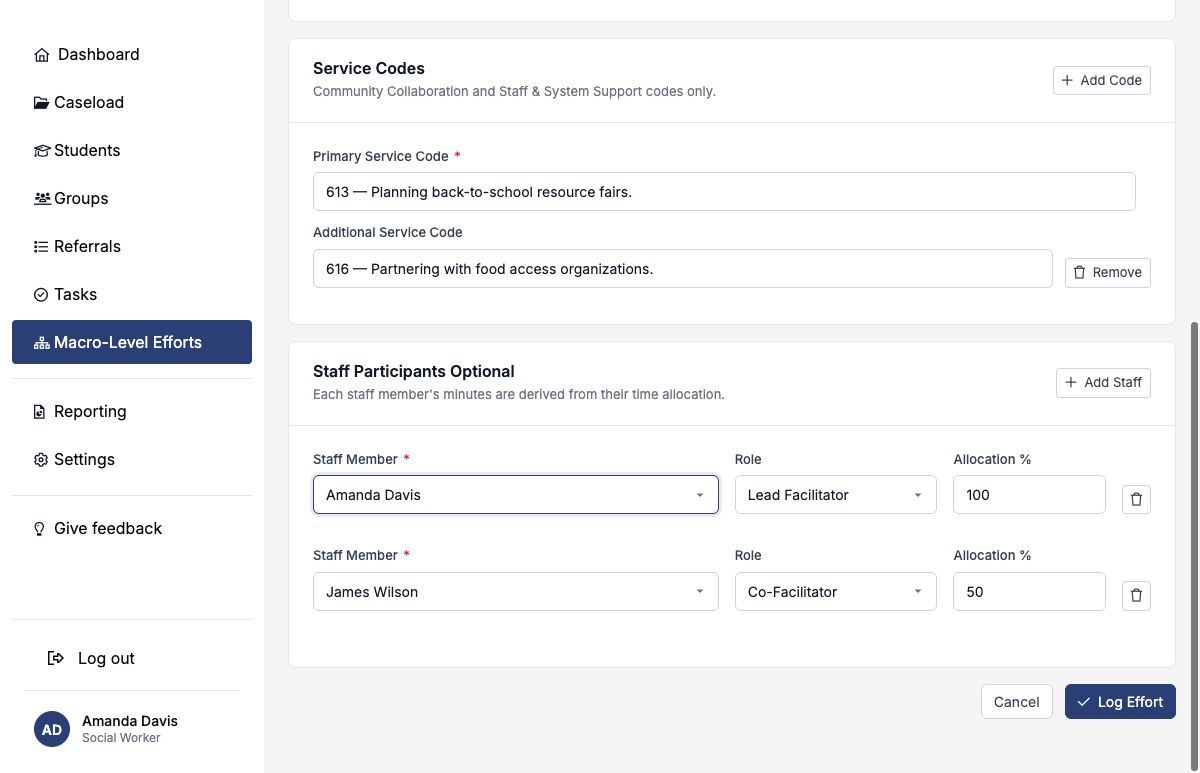
| Allocation | Meaning in a 90-minute effort |
|---|---|
| 100% | The staff member participated for the full effort: 90 minutes. |
| 50% | The staff member participated for half of the effort: 45 minutes. |
| 0% | The person may be named for context, but no working minutes are attributed. |
Available roles include Lead Facilitator, Facilitator, Co-Facilitator, Participant, Observer, Presenter, and Intern. Allocations do not need to total 100%; each percentage is evaluated independently against the effort duration.
Review, filter, and report the work
The Macro-Level Efforts workspace lists the service date, category, primary code, scope, tier, duration, and staff count. Filter by date range, school—including District-wide—category, tier, or academic year to review a body of work.
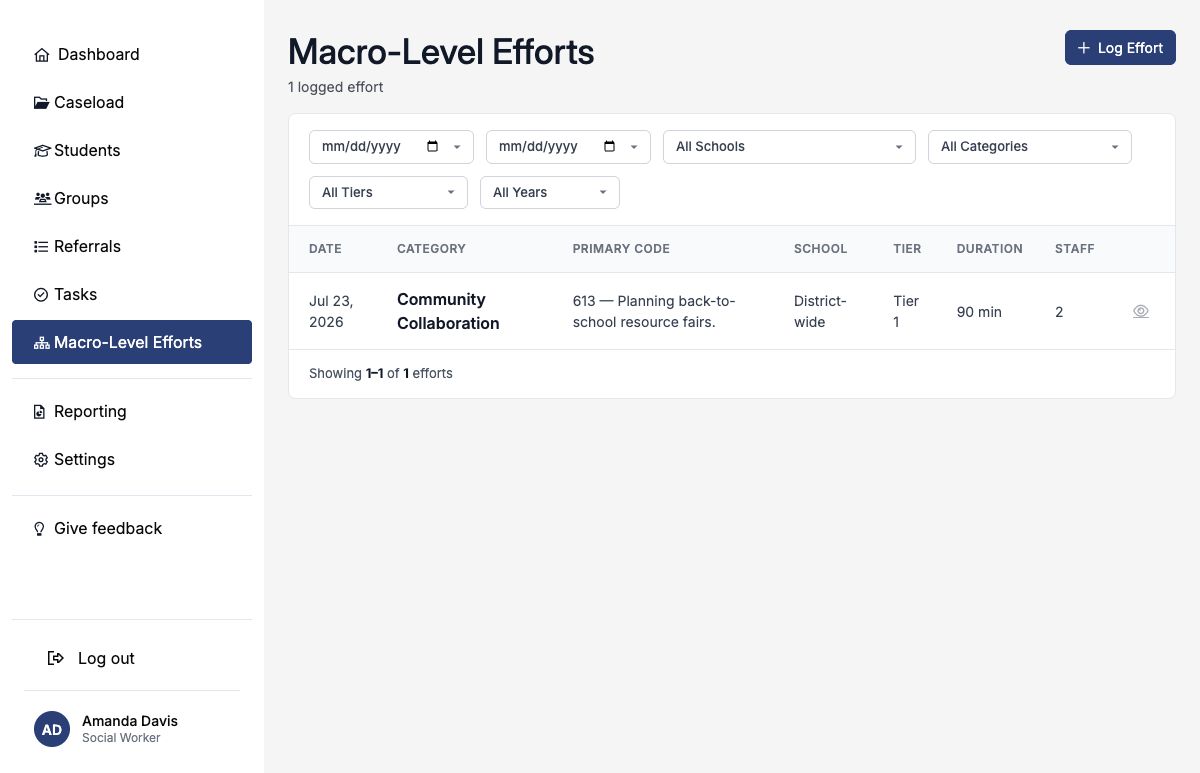
These records contribute to intervention and administrative reporting, including macro-level effort counts, hours, and staff participation. Consistent dates, durations, scopes, primary codes, and staff allocations make those summaries more reliable.
Add supporting attachments
After saving, use the effort’s Attachments section for authorized agendas, training materials, planning documents, or other supporting files. You may upload up to four files at once, with a maximum size of 25 MB each. Supported formats include PDF, common images, Word, Excel, and CSV.
Macro-level records usually do not need student-identifying information. Upload only materials that are authorized and necessary for the administrative record.
Access, editing, and deletion
Permitted professional and administrative users can view efforts within their district and school access. District-wide efforts are available to permitted users across the district; school-scoped efforts follow school access.
The person who logged the effort—or an administrator—can edit or delete it. Use editing to correct the date, scope, codes, staff, or description while preserving the record.
Deleting an effort also removes its staff rows, service codes, attachments, and uploaded files. SocialNote requires the exact effort category as confirmation. Delete only an erroneous duplicate or a record that should never have been created; otherwise, correct it through editing.
Completed example: district resource-fair coordination
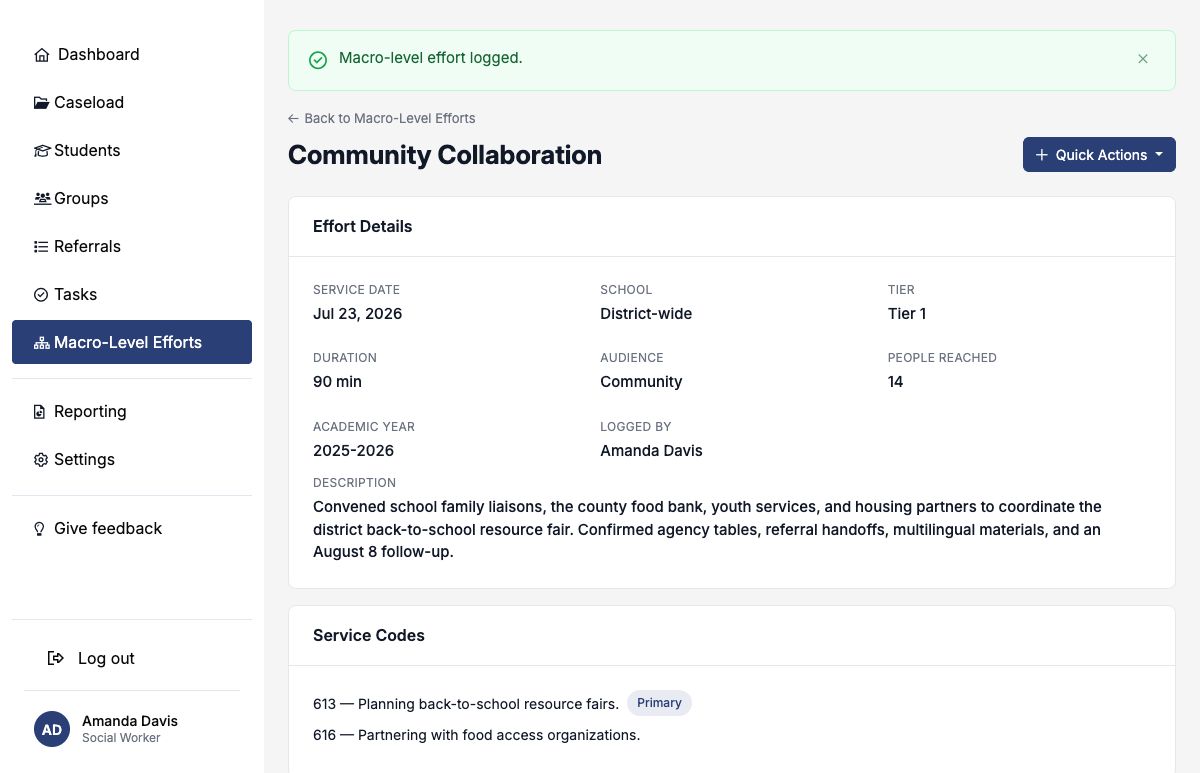
| Field | Example entry |
|---|---|
| Category | Community Collaboration, derived from primary code 613. |
| Service Date | July 23, 2026; academic year 2025–2026. |
| Scope and Tier | District-wide; Tier 1. |
| Duration and Reach | 90 minutes; Community audience; approximately 14 people reached. |
| Primary Code | 613 — Planning back-to-school resource fairs. |
| Additional Code | 616 — Partnering with food access organizations. |
| Staff | Amanda Davis, Lead Facilitator, 100% / 90 minutes; James Wilson, Co-Facilitator, 50% / 45 minutes. |
| Description | Convened family liaisons and community partners; confirmed agency tables, referral handoffs, multilingual materials, and an August 8 follow-up. |
- Use this record only for work that is broader than an individual student or defined student group.
- Log one dated entry for each completed activity.
- Choose District-wide or a school intentionally.
- Make the primary code match the effort’s main purpose.
- Keep audience reach separate from named staff participation.
- Use allocations to represent each staff member’s actual portion of the duration.
- Describe the action, result, and next coordination step.